What a tracker is, and what it is not
A GPS tracker for a fleet car is a small piece of hardware, plugged into the vehicle itself, that reports the car's location on its own schedule. It is not the same thing as watching a driver's phone. A phone can be switched off, left at home, or running a location-sharing app the driver has quietly turned off, and whatever it reports belongs to a personal device that isn't yours to begin with.
A plug-in tracker changes what you're actually looking at. Instead of a person's phone, you have a device wired into the car, reporting whether the car is moving or parked, regardless of whose phone is in the cupholder or whether that phone even has a charge left.
| A driver's phone | A plug-in tracker | |
|---|---|---|
| Whose device is it | The driver's | The car's |
| Keeps reporting if the phone is off or left behind | No | Yes |
| Evidence weeks later, for a toll or a ticket | Depends on the driver remembering | On file, same as the day it happened |
The difference shows up on the one day it matters: when a toll, a ticket, or a driver's own account of events needs something better than a memory that has had weeks to go fuzzy.
Position and trips: the baseline
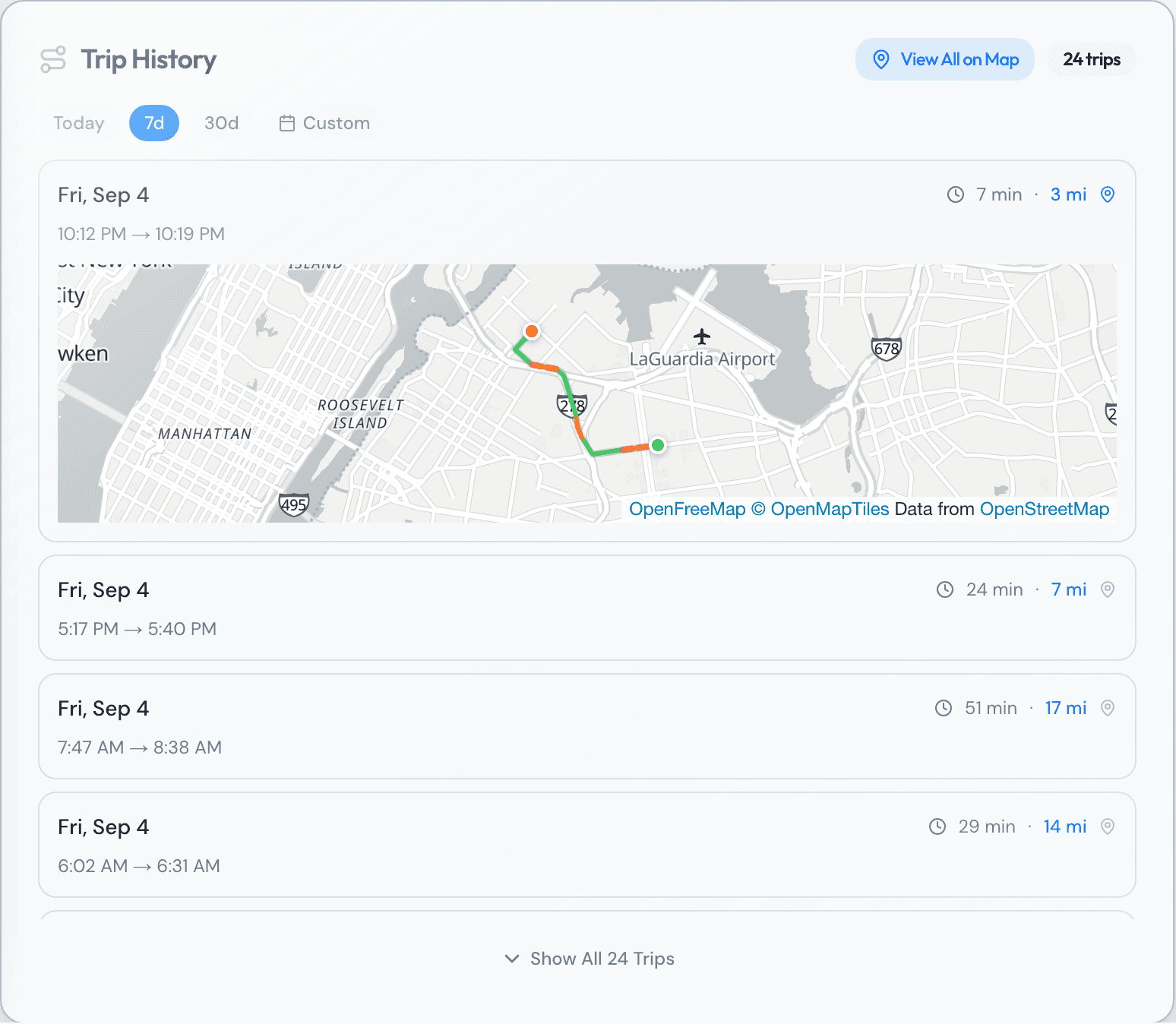
The simplest thing a tracker reports is where the car is right now. The more useful thing is where it has been. Every trip gets logged with a start point, a stop point, the distance covered, and how long it took, which turns a day on the road into a list you can search instead of a blank you have to fill in from memory or from a driver's word.
That list answers the ordinary questions first, the ones that used to mean a phone call: which car went out to an airport run three times on a Thursday, whether a car sat parked in one spot for six hours in the middle of a shift, or where a specific car was at 3:15 in the afternoon two weeks ago. None of that requires asking anyone. It's already written down, timestamped, and searchable by car or by date.
Speed, harsh events, and idle time
Beyond position, a tracker adds three more numbers worth checking. Speed, both a live reading and the fastest a car went on a given trip. Harsh events, meaning hard braking or hard acceleration, the kind that wears a car out faster than normal driving and often says something about how it's being handled. And idle time, meaning how long the engine ran while the car wasn't moving at all.
None of these numbers mean much as a single data point. A hard-braking event on a highway on-ramp isn't the same as one outside a school. A high top speed on an empty parkway at 4 a.m. reads differently than the same number on a city avenue at rush hour. Idle time during a slow afternoon looks identical, on paper, to idle time spent somewhere it shouldn't be. Read across a week or a month instead of one trip, these numbers turn into a pattern worth acting on. Read as a single flagged event, they're closer to noise.
What a tracker doesn't tell you
It's worth being honest about the limits. A tracker tells you where the car was, not who was sitting in which seat, so it can't settle an argument about which of two people in a shared car was driving at the time. It isn't a camera: it has no picture of the crossing, the parking spot, or the moment of impact, only a location and a timestamp. And it doesn't replace a conversation with a driver. A pattern of harsh braking is a reason to ask what's going on, not a verdict on its own.
What it is good at is narrower and more useful than any of that: putting a car, reliably, at a place and a time, for as long as the history is kept. That's a smaller claim than watching everything, and it's the one that actually holds up weeks later when someone needs an answer.
Why it needs its own SIM
A plug-in tracker carries its own cellular connection, the same basic idea as the SIM card in a phone, except this one belongs to the car and answers to nobody's personal phone plan. That's what lets it report continuously, on its own schedule, rather than only when it happens to be near a driver's phone or a wifi signal. It doesn't wait for a driver's phone to have battery, signal, or an app left open in the background, because it isn't relying on any of those things.
The tradeoff is that the tracker is its own piece of equipment, with its own connection to maintain, separate from anything the driver carries or controls. That's also the entire point of it. It reports to the fleet because it belongs to the fleet, not because a driver remembered to leave something running or agreed to share their own phone's location for the day.
Why the history matters weeks later
A toll or a ticket rarely settles on the day it happens. E-ZPass New York generally posts a tag read to a New York account within a few days of the crossing, but a plate read, the kind generated when the tag didn't register, turns into a mailed bill instead, and that takes longer to arrive. A parking or camera ticket gives you 30 days to pay or dispute it, and that clock starts on the date it was mailed, not the date of the violation, so the trail is already weeks old by the time the notice shows up in an envelope.
Whatever kind of TLC vehicle you run, the question that eventually comes up is the same one: where was this car, and who had it, on a day that has since gotten fuzzy in everyone's memory. A trip history that was written down at the time is the only record that still has a clear answer once the people involved have stopped remembering the details, or have every reason to remember them differently.
Keeping the history attached to the right driver
Collecting the history is the easy part. Attaching it to the right person after the fact is where it gets hard. Cars in a rental fleet change hands often, sometimes within the same week, and a trip logged on a Tuesday belongs to whoever had the car on Tuesday, not whoever happens to have it when someone finally pulls the report.
Fleets that get this right keep one simple record current: each driver's start date and end date on each car. Fleets that don't, end up with a pile of coordinates and no way to say who was behind the wheel when it mattered. The tracker did its job either way. Whether that job turns out to be useful comes down entirely to whether the dates sitting next to it are actually right.
None of this is about watching a driver in real time. It's about having an answer ready for the moment, weeks from now, when a toll authority, a camera ticket, or a driver's own account of what happened needs something more solid than a guess. A tracker that reports on its own, matched to accurate dates, turns that moment into a lookup instead of an argument.
Questions fleets ask
- Do Teslas need a separate tracker installed?
- No. A Tesla already reports its location and trip data over its own built-in cellular connection, the same job a plug-in tracker does in any other car.
- How far back should trip history go?
- As far back as the tolls and tickets that arrive late. A parking or camera ticket can take 30 days just to reach its deadline after it's mailed, and a plate-read toll can take longer than that to post, so a few weeks of history is the practical minimum.
- Does idle time mean a driver is wasting time?
- Not by itself. Idle time while waiting for a fare looks identical, on paper, to idle time spent somewhere it shouldn't be. It's useful as a pattern read over weeks, not as a single number.
- What happens to trip history when a driver leaves?
- It should stay exactly where it was: attached to the dates that driver actually had the car. That's what lets a late toll or ticket still find the right person after they're gone.
Sources
- Metropolitan Transportation Authority, E-ZPass and Congestion Relief Zone tolling
- NYC Department of Finance, Parking and camera tickets
- E-ZPass New York
- Tesla, Connectivity
Built and used every day by a working NYC TLC fleet.